Meal cart maintenance and replacement parts
TL;DR
- Identify the cart and obtain its service instructions before authorizing a repair. The documents below describe Uptime kits, upgrades and caster applications.
- Request model-specific service intervals, lubrication schedules and heater repair instructions. Those procedures remain undocumented in the cited sheets.
What information identifies the right replacement part?
Send the cart model number, serial number or identification-label photograph, installed caster or heater information and a description of what staff observed. If the request concerns a maintenance kit, identify the cart it will support. Record when staff noticed it and which meal-service route it affected. Keep the cart's original purchase record and any prior modifications together so the service contact can identify the installed configuration.
The Uptime Maintenance Kit sheet names several cart families and says kits contain common replacement items. It provides no universal part-number crosswalk. [1] Ask JonesZylon to match the kit and each replacement item to the cart before ordering.
What is in the Uptime Maintenance Kit?
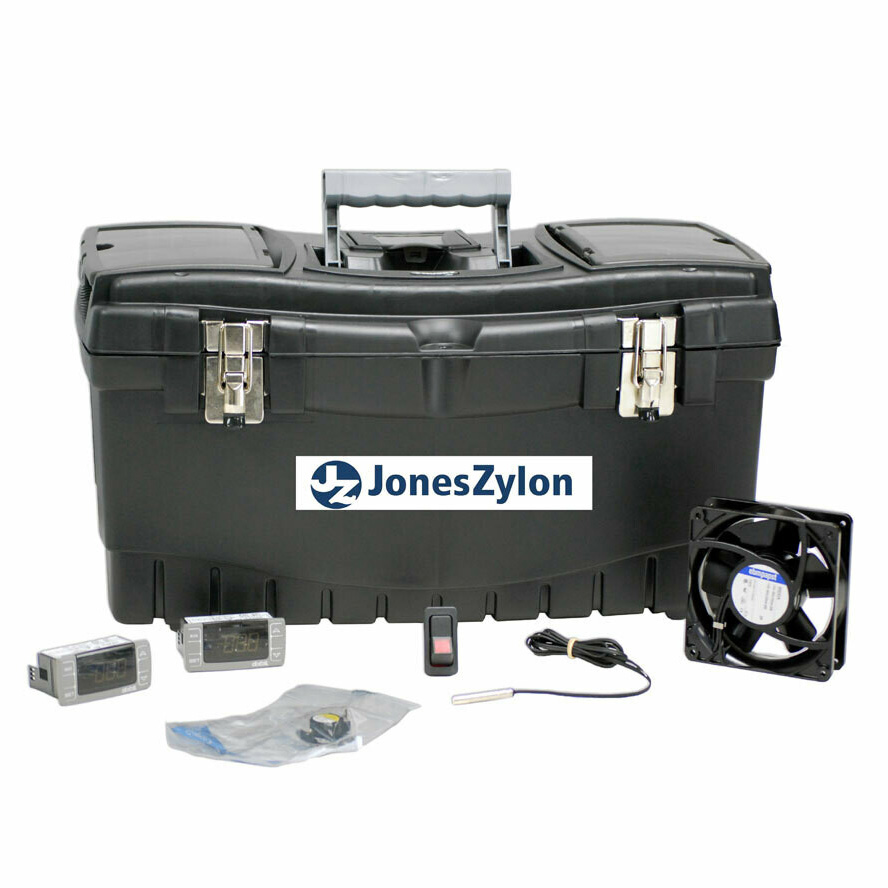
The manufacturer lists a heating element, controllers, power cord, gasket, fan motor, hinges and rocker switch among common replacement items. It also lists special sockets and describes a lockable box for storage and organization.
The kit sheet names JZHR-144 (HH, HA, RR), JZHR-120 (HH, HA, HR), JZH-12UBT, 6UBT and 10UBT, and Mission Ready carts. These are the document's family labels. Send the complete installed model to JonesZylon for a current kit match rather than deriving an ordering code from the abbreviated list. [1]
How should staff track parts used from the kit?
- Use the kit's lockable box to store and organize its contents as described in the sheet. [1]
- As a facility recordkeeping practice, note the cart identification, component taken, work-order reference and person responsible whenever a part leaves storage.
- The sheet describes replenishing parts as they are used and adding other parts the operation needs. Request the replacement by the approved component identification. [1]
- Keep the updated inventory with the kit and give maintenance the replenishment status before the next service planning review.
Choose the facility's inventory review timing from its own workload and parts consumption. The source supplies no scheduled interval or minimum stock quantity. Request installation instructions and identify who may perform the work separately from ordering spare inventory.
Which repairs require model-specific instructions?
Request manufacturer instructions covering electrical isolation, heater removal, controller setup, gasket installation, fastener torque and return-to-service testing. These procedures remain undocumented in the kit sheet, Heavy Duty Upgrade sheet and caster guide. The facility’s responsible maintenance personnel must determine the work process. [1] [2] [3]
For a service request, describe observable behavior without guessing the failed component. Examples of useful observations include an indication that changed, a door that no longer closes as expected or a wheel that behaves differently on a known section of the route. Send photographs and the relevant service record. Follow the facility's approved equipment-handling and contingency process while the service contact assesses the issue.
Which caster description matches the route?
The caster guide groups options by the surface or condition being considered. Use its written descriptions to explain the application to JonesZylon. The table summarizes the guide’s application descriptions. Ask JonesZylon for load and speed limits for the proposed assembly. [3]
| Caster named in guide | Documented application or construction | Source |
|---|---|---|
| Premium multi-terrain | All-purpose category; cushioning is described for cracks. | [3] |
| Carpet | Flat tread and thin profile, described for soft surfaces. | [3] |
| Premium endurance | Pressed steel core and solid rubber tire, described for abrasive surfaces. | [3] |
| Zinc plated sealed bearing | Zinc plating and sealed bearings, described for wet conditions. | [3] |
| Extreme tread | Traction category; material is described as puncture resistant. | [3] |
Photograph the narrow turns, thresholds, soft surfaces and exposed route sections relevant to the request. The extracted guide's application-chart markings do not establish a readable compatibility matrix, so no towing permission or surface-by-surface rating is reproduced here.
What should the service record contain?
Keep a record of the reported condition, cart identification, service instructions used, installed part identification and the person who performed the work. Add the checks required by the applicable instructions and the facility's return-to-service process. Record any change to capacity, electrical configuration, locking hardware or caster arrangement so the food service team has the same equipment description as maintenance.
Attach the record to the asset file and update the parts inventory after the work is accepted. For recurring issues, collect the actual repair history before proposing a different spare-parts quantity or upgrade. These are administrative planning steps; service intervals and technical procedures must come from the instructions applicable to the equipment.
What should accompany a maintenance quote request?
Send the equipment list, observed issue, desired kit or upgrade, photographs and the date by which the facility needs a service response. Request written confirmation of component fit, supplied contents, applicable instructions and any warranty coverage for the proposed work. Ask JonesZylon to state availability and the proposed delivery period in the quote.
Use cart options and accessories to identify the product family and Mission Ready carts for the equipment overview. When a repair changes the loading arrangement, revisit cart and tray compatibility. For replacement equipment, carry the documented issue into the buying guide and RFP checklist.
Frequently asked questions
Does the Uptime kit sheet set a service interval?
No. It describes kit contents, storage and replenishment. Obtain the maintenance schedule and technical procedures applicable to the installed cart.
Are all Uptime kit parts interchangeable?
The sheet names cart families but supplies no universal component crosswalk. Confirm each kit and replacement component with JonesZylon using the full cart identification.
Can the caster guide be used as an installation manual?
The guide describes caster options and applications.
Talk to a JonesZylon corrections specialist.
800-848-8160 | solutions@joneszylon.com | 305 Center Street, West Lafayette, OH 43845
Sources
- Uptime Maintenance Kit.pdf (manufacturer document). /pdf/Sell%20Sheets/Uptime%20Maintenance%20Kit.pdf (accessed 2026-09-08)
- Heavy Duty Upgrade.pdf (manufacturer document). /pdf/Sell%20Sheets/Heavy%20Duty%20Upgrade.pdf (accessed 2026-09-08)
- JonesZylon Caster Guide.pdf (manufacturer document). /pdf/Catalog/JonesZylon%20Caster%20Guide.pdf (accessed 2026-09-08)